How Can I Improve My Posture While Working at a Desk
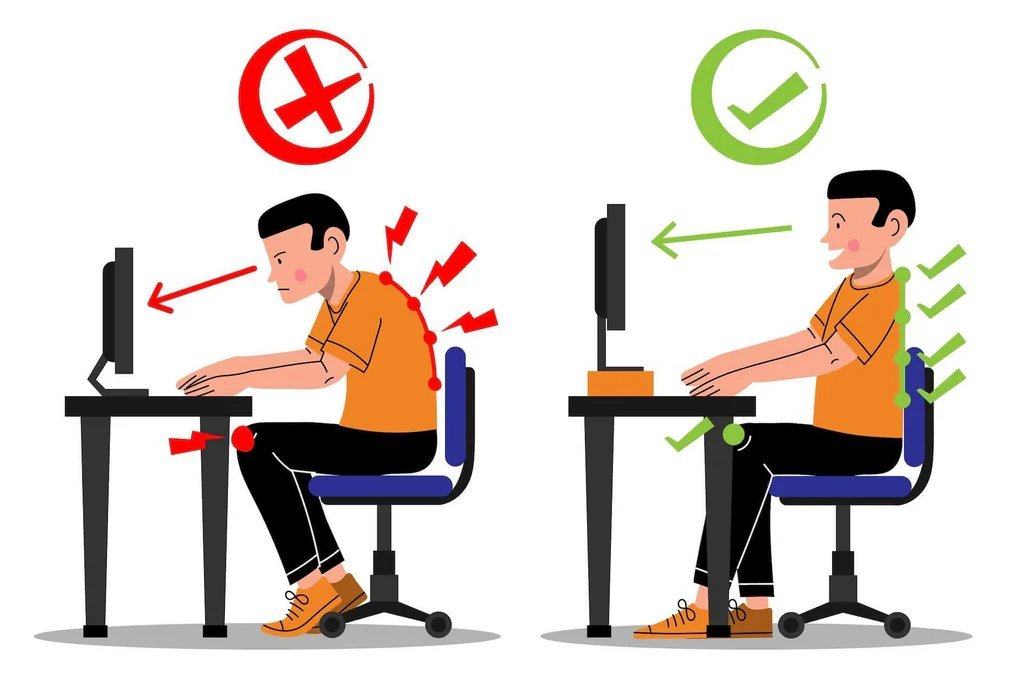
Neck ache by noon. Shoulders up around your ears by 3 PM. That dull lower-back throb that follows you home. If you work at a desk, your posture is probably costing you comfort, energy, and eventually health. The question how can I improve my posture while working at a desk has better answers than “just sit up straight” — because willpower alone never fixed anyone’s ergonomics.
Good posture is not about rigid military bearing. It is about setting up your environment so good posture is the easy option, then building the movement habits that support it.
How Can I Improve My Posture While Working at a Desk? Fix the Setup First
Your body adapts to your workstation, not your intentions. Get the ergonomics right:
- Monitor at eye level: the top of the screen at or slightly below eye level, about an arm’s length away — looking down at a laptop all day is the number one posture destroyer; use a laptop stand plus external keyboard
- Chair height: feet flat on the floor, knees at roughly 90 degrees, thighs parallel to the floor
- Lumbar support: your lower back needs support maintaining its natural curve — a chair with built-in lumbar support or a $20 lumbar pillow
- Elbows at 90 degrees: keyboard and mouse at elbow height, close to your body — reaching forward rounds the shoulders
- Phone habits: no cradling the phone between ear and shoulder — use speakerphone or a headset
This setup alone resolves a shocking percentage of desk-related pain. Most “posture problems” are actually furniture problems.
The Sitting Itself: What Good Looks Like
- Sit back in the chair: use the backrest — perching on the edge defeats its purpose
- Shoulders relaxed and slightly back: not forced back like a soldier, just not rounded forward
- Chin slightly tucked: counteracts the forward-head creep; imagine a string pulling the crown of your head upward
- Weight even: no crossing legs all day (occasional is fine), no leaning to one side
- Unclench: jaw, shoulders, hands — desk workers carry astonishing tension they do not notice until they check
Movement: The Real Secret
Here is what posture experts actually emphasize: your best posture is your next posture. The human body is not designed for any static position — even “perfect” sitting becomes harmful after hours. What matters:
- Stand every 30-60 minutes: even 2 minutes of standing and walking resets everything; set a timer until it is habit
- Consider a sit-stand desk: alternating through the day is ideal — aim to build toward 2-4 hours of standing total, introduced gradually
- Walk on calls: phone meetings are walking meetings waiting to happen
- Take the long way: bathroom, water, printer — manufacture movement reasons
Exercises That Fix Desk Posture
- Chin tucks: pull chin straight back (making a double chin) — hold 5 seconds, 10 reps; directly counteracts forward head posture
- Doorway chest stretch: forearms on doorframe, lean forward — opens the chest muscles that desk-sitting shortens; hold 30 seconds
- Wall angels: back against wall, arms in “goalpost” position, slide up and down — retrains shoulder blade positioning
- Rows (band or dumbbell): strengthen the upper back muscles that hold shoulders back — the single best exercise for desk posture
- Hip flexor stretches: half-kneeling lunge stretch — sitting shortens hip flexors, tilting the pelvis and stressing the lower back
- Glute bridges: wake up the glutes that hours of sitting put to sleep (see exercises for lower back pain for the full routine)
Ten minutes of these daily outperforms any posture brace or reminder app.
What Does NOT Work
- Posture braces: they do the work your muscles should do, weakening them over time — useful briefly for awareness, harmful as a crutch
- “Just sit up straight”: unsustainable without setup changes and muscle conditioning
- Expensive ergonomic gadgets before basics: a $1,500 chair will not fix a monitor at lap height — fix the free things first
- Ignoring pain: persistent neck, shoulder, or back pain despite setup fixes deserves professional evaluation — a physical therapist can identify what generic advice cannot
Standing Desks: Worth It?
The standing desk is the most hyped ergonomic purchase. Here is the evidence-based verdict:
- What they actually do: reduce sedentary time, modestly increase calorie burn (~50 cal/hour vs. sitting), and many users report less back discomfort. The benefits are real but modest — they are not the posture cure marketing suggests.
- What they do not do: fix posture automatically (people slouch standing too), produce meaningful weight loss, or compensate for zero exercise. Standing all day creates its own problems — foot, knee, and varicose vein issues.
- The right way to use one: alternate, do not replace — start with 20-30 minute standing intervals, build toward roughly equal sit-stand split. Anti-fatigue mat is non-negotiable for comfort. Monitor stays at eye level in both positions (this requires a proper adjustable setup, not just a tall desk).
- Transition gradually: jumping to full-day standing causes foot and leg pain that makes people quit. Add 30 minutes of standing per day each week. Your body adapts; give it time.
- Budget options work: a $35 laptop stand plus external keyboard achieves the key benefit (screen at eye level) for a fraction of motorized desk prices. The expensive desk is nice; the ergonomic principles are what matter.
- The verdict: worth it if you alternate sensibly and maintain the other habits (movement breaks, exercises, proper setup). Not worth it as a magic fix purchased instead of those habits. The desk is a tool; the behavior is the treatment.
Whether sitting, standing, or alternating — the principles from this article apply: good setup, frequent movement, targeted exercises. The position matters less than the pattern. Move often, sit well when you sit, stand well when you stand, and your body will thank you for decades.
This article is for informational purposes only and is not medical advice.
Related reading: poor desk posture is a leading cause of tension headaches — see why afternoon headaches happen every day.
Further reading: OSHA's ergonomics guidelines offer authoritative workstation setup standards.
The Bottom Line
Raise your monitor to eye level, support your lower back, keep keyboard at elbow height, move every 30-60 minutes, and do 10 minutes of targeted exercises daily — chin tucks, chest stretches, rows, hip flexor stretches. Posture is not a position you hold; it is an environment you build and a movement habit you maintain. Fix the setup once, move often, strengthen the weak links, and the aches that used to define your workday fade into memory.
This article is for informational purposes only and is not medical advice.