
Resetting Your Car’s Maintenance Light: A DIY Guide
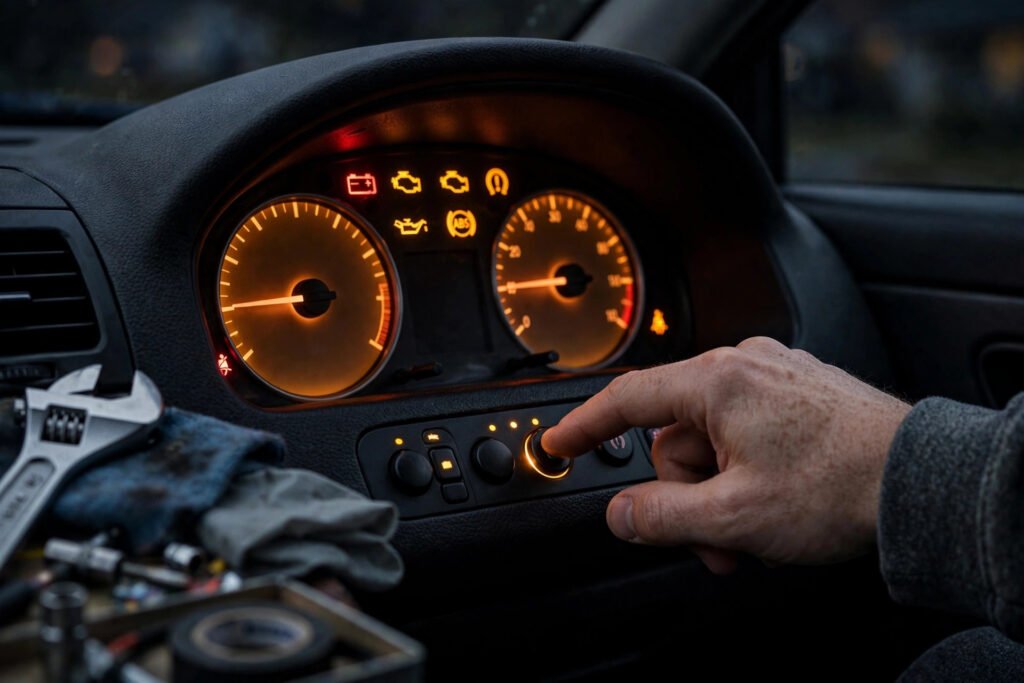
There it is again — that little wrench icon glowing on your dashboard, judging you. You just had the oil changed last week, everything’s fine, but the maintenance light won’t quit. Do you really need to drive back to the shop (and pay a diagnostic fee) just to turn off a reminder light? Almost certainly not. Resetting your car’s maintenance required light is a simple procedure on most vehicles — usually a specific button sequence you can do in your driveway in under two minutes. Here’s how to do it yourself for the most common makes, when resetting is appropriate, and when that light is telling you something you shouldn’t ignore.
Maintenance Light vs. Check Engine Light: Know the Difference
Before touching anything, identify which light you’re seeing — they mean very different things. The maintenance required light (often a wrench icon or the words “MAINT REQD”) is simply a mileage-based reminder, typically triggered every 5,000–10,000 miles to prompt scheduled service like oil changes and tire rotations. It’s a calendar alert, not a diagnosis. Resetting it after completing the service is correct and expected.
The check engine light (an engine outline, sometimes flashing) is entirely different: it indicates the onboard computer detected a fault — anything from a loose gas cap to a failing catalytic converter. Never “reset” a check engine light by disconnecting the battery to make it disappear; you’re erasing diagnostic data your mechanic needs, and the light will return because the underlying problem persists. If your check engine light is on (especially flashing, which signals active engine damage), get a proper diagnosis — auto parts stores in America will read the codes free, giving you the starting point for real troubleshooting. This guide covers only the maintenance reminder — the benign one.
The General Method (Works on Most Cars)
Most maintenance lights reset through a variation of this sequence: with the engine off, press and hold the trip odometer reset button (or the designated dashboard button); while holding it, turn the ignition to ON (not START — accessories power only); continue holding for 5–10 seconds until the light blinks and goes out; release the button, turn the ignition off, then start the car to confirm. That’s it. The procedure takes longer to read about than to perform.
The exact sequence varies by manufacturer and model year, which is why your owner’s manual is the definitive source — the reset procedure is always documented there, usually in the maintenance or instrumentation section. If you’ve lost the manual, the manufacturer’s website hosts free PDF versions for nearly every model. The key variables across makes: which button to hold (trip reset, menu, or a dedicated button), whether the ignition should be in ON or ACC position, and whether you navigate through a dashboard menu instead. When in doubt, search specifically for your year, make, and model — “2021 Honda CR-V maintenance light reset” — because procedures change between generations. Edmunds’ owner resources and how-to guides cover reset procedures for popular models.
Make-Specific Procedures for Popular Models
Toyota/Lexus/Scion: With the odometer displaying total mileage (not Trip A/B), turn the ignition off. Press and hold the trip reset button, turn the ignition to ON while holding, and keep holding until the odometer displays a series of dashes that count down to zero — then release. The light resets. (On newer models with multi-information displays, navigate: Settings → Vehicle Settings → Maintenance System → Oil Maintenance → Reset.)
Honda/Acura: For models with a simple wrench light — turn ignition to ON, press the trip reset button until the oil life display shows, then press and hold until it blinks and resets to 100%. For models with the touchscreen Maintenance Minder: go to Settings → Vehicle → Maintenance Info → select the item → Reset. Nissan: use the steering wheel buttons to navigate the vehicle information display to Settings → Maintenance → Engine Oil (or Tire) → Reset. Ford: use steering wheel controls — Settings → Vehicle → Oil Life Reset — then hold OK until it resets to 100%. GM (Chevrolet, GMC, Buick): with the engine off but ignition ON, fully press the accelerator pedal three times within five seconds — the light should flash and reset. (Yes, really.) Hyundai/Kia: instrument cluster menu via steering wheel buttons → Service Interval → Reset. Always verify against your manual, as mid-generation updates change procedures.
When Resetting Is Right — and When It’s Wrong
Resetting is correct when: you’ve actually performed the scheduled maintenance (oil change, rotation, filters) and the light is just the reminder; or a shop performed the service but forgot to reset the light (extremely common — call them first, but resetting yourself saves the trip). In both cases, you’re aligning the reminder system with reality.
Resetting is wrong when: you’re using it to silence the light without doing the maintenance — the reminder exists because the service interval matters, and “resetting away” oil changes is how engines die young. It’s also wrong if you’re resetting to hide service history when selling the car (dishonest, and a pre-purchase inspection will reveal the truth anyway). And never confuse this with check-engine-light issues: if the malfunction indicator is on, you need diagnosis, not a reset dance. One more caution — some European makes (BMW, Mercedes, VW/Audi) require a scan tool or specific software for service resets; the button dance won’t work, but affordable consumer scan tools ($20–$100) handle most of these. AAA’s vehicle maintenance guidance covers which services actually matter at each interval, so your resets always follow real maintenance.
Beyond the Light: Building a Maintenance Habit That Works
The maintenance light is a crude tool — a mileage counter, not a condition assessment. Smarter owners track actual service: keep a simple log (phone notes app is fine) of every oil change, rotation, filter, and fluid service with dates and mileage. Follow your manual’s severe-service schedule if you do mostly short trips, extreme temperatures, or dusty conditions — which describes more American driving than the “normal” schedule assumes. And bundle the reset into a post-service ritual: service done, light reset, log updated, next interval noted.
This DIY mindset extends well beyond dashboard lights. The same self-reliance that resets a maintenance light in two minutes applies to countless small car tasks that shops charge $50–$150 to perform — cabin air filters, wiper blades, battery terminal cleaning. Each one you handle yourself builds the confidence and savings that compound over ownership. It’s the same philosophy behind speeding up an old slow computer without buying a new one — a few minutes of DIY beats paying retail for simple fixes. And when you’re evaluating what a car will cost long-term, factor in maintainability alongside the sticker price — our framework for saving for a big purchase helps you budget true ownership costs.
The Bottom Line
Resetting your car’s maintenance light yourself takes under two minutes: hold the trip button, ignition to ON, wait for the blink, done — with make-specific variations documented in your owner’s manual. Do it after completing the actual scheduled service, never as a substitute for it, and never confuse the maintenance reminder with a check engine light that needs real diagnosis. It’s the smallest possible DIY win, but it’s also the gateway: once you realize the dealer wanted $65 to press a button, you start wondering what else you can handle yourself. (A lot, as it turns out.)
Frequently Asked Questions
Will resetting the maintenance light affect my warranty?
No — resetting the reminder after performing the scheduled maintenance is the correct procedure and doesn’t affect warranty coverage. Just keep records of the actual service performed.
Why is my maintenance light still on after an oil change?
The shop likely forgot to reset it — extremely common. You can reset it yourself using the procedure in your owner’s manual rather than driving back.
Can I reset the maintenance light by disconnecting the battery?
It sometimes works but it’s a bad method: it erases radio presets, clock settings, and learned engine parameters, and on some cars triggers anti-theft lockouts. Use the proper button sequence instead.
What’s the difference between the maintenance light and check engine light?
The maintenance light is a mileage-based service reminder (benign). The check engine light indicates a detected fault requiring diagnosis. Never try to “reset away” a check engine light — get the codes read and fix the underlying issue.