What Is Ray Tracing and Does It Matter for Gameplay
Ray tracing is the most hyped graphics technology of the last decade — marketed as the thing that makes games look “real,” blamed for tanking framerates, and debated endlessly over whether it actually matters. NVIDIA built an entire GPU generation around it; consoles advertise it on the box; and most players can’t reliably tell when it’s on. So what is ray tracing actually doing, and does it matter for how games play — or just for screenshots? The answer requires understanding what came before it, and it’s more interesting than the marketing.
What Ray Tracing Actually Is
At its core, ray tracing is beautifully simple: it simulates light the way light actually works. In the real world, light travels from sources (sun, lamps), bounces off surfaces, and some of it reaches your eyes — with each bounce picking up color and losing energy. Ray tracing replicates this by casting rays from the camera through each pixel, tracing their paths as they bounce around the scene, and computing what each pixel should show based on those light paths. It’s physically-based rendering: instead of faking lighting with tricks, you simulate photons.
This sounds computationally insane — and it is. A single frame might require millions of rays, each bouncing multiple times, with the scene geometry tested at every step. That’s why real-time ray tracing only became feasible with dedicated hardware (NVIDIA’s RT cores, AMD’s ray accelerators, console custom silicon) and aggressive optimization. The key insight making it practical: you don’t need to trace every photon — you trace a sparse sample and use AI denoising (NVIDIA’s DLSS Ray Reconstruction, for example) to fill in the rest. Modern ray tracing is really “ray tracing plus machine learning cleanup,” and the ML half is doing enormous work.
What It Replaces: The Tricks That Came Before
To appreciate ray tracing, understand the hacks it replaces. Traditional “rasterization” rendering fakes lighting with a toolbox of approximations: screen-space reflections (only reflect what’s currently visible on screen — look at water, then look up, and the reflection breaks); baked lighting (pre-computed lightmaps that can’t respond to dynamic changes — move a light and the shadows lie); cube maps (static environment reflections that don’t match the actual scene); fake ambient occlusion (darkened creases painted on, roughly); and shadow maps (limited resolution, prone to artifacts).
Skilled artists made these tricks look spectacular — which is exactly why the ray tracing debate exists. A masterfully lit rasterized game (Red Dead Redemption 2, God of War) can look better than a poorly implemented ray-traced one. The tricks, in expert hands, are remarkably convincing. Ray tracing’s advantage isn’t that it always looks better — it’s that it looks correct automatically, in every lighting situation, without artists hand-faking each scenario. It’s the difference between a brilliant forgery and the real thing: sometimes indistinguishable, but one generalizes and the other doesn’t.
Where Ray Tracing Actually Matters (and Where It Doesn’t)
Matters most: reflections, global illumination, shadows
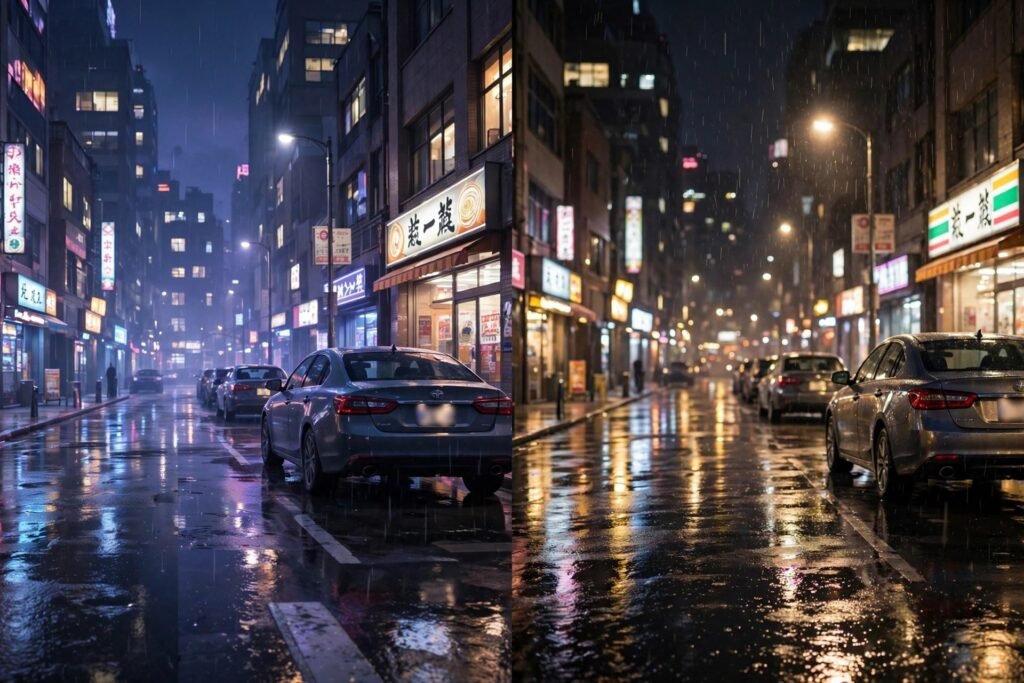
Reflections: Ray-traced reflections show what’s actually there — including off-screen objects — with correct roughness and blur. In games with lots of reflective surfaces (rainy city streets in Cyberpunk 2077, marble halls, water), the difference is dramatic and immediately visible. Global illumination: Light bouncing between surfaces creates the subtle color bleeding and soft ambient light that makes scenes feel real — a red wall tints nearby white surfaces pink. Rasterized approximations of this are crude; ray tracing does it correctly. Shadows: Ray-traced shadows have physically correct softness varying with light size and distance — penumbrae that look natural instead of the hard or blobby shadows of shadow maps.
Matters least: when you’re actually playing
Here’s the honest caveat: during active gameplay — moving, aiming, reacting — most players don’t notice ray tracing. The differences emerge in slow moments: admiring a vista, walking through a neon street, pausing to look at water. Screenshot comparisons flatter ray tracing enormously because they capture exactly the contemplative viewing where it shines. In motion, at speed, making decisions, the rasterized tricks hold up remarkably well. This is why competitive players disable it universally: the visual gain is imperceptible mid-duel, while the framerate cost is very perceptible.
The framerate trade-off (the real question)
Ray tracing typically costs 30–50% of framerate — the difference between 120fps and 60–80fps, or 60fps and 30–45fps. For single-player cinematic games on capable hardware with DLSS/FSR upscaling, the trade is often worth it. For competitive multiplayer, high-refresh enthusiasts, or modest hardware, it’s not. The technology’s future depends on this cost shrinking — and it is, through better denoising, more efficient algorithms, and faster hardware. But today, it’s a genuine trade-off, not a free upgrade.
The Verdict: Does It Matter for Gameplay?
Strictly for gameplay — the interactive experience of playing — ray tracing matters little. It doesn’t change mechanics, responsiveness, or decision-making. No one wins more gunfights because of accurate reflections. But for the experience of playing — immersion, atmosphere, the feeling of being somewhere — it matters significantly in the right games. Horror games with realistic light behavior are scarier. Atmospheric explorations feel more tangible. The rain-slicked street at night, done right, is worth the framerate.
The practical guidance: enable ray tracing for slow-paced, atmospheric single-player games on hardware that can sustain 60fps with it (use DLSS/FSR Quality mode to offset the cost); disable it for competitive multiplayer, fast-paced action where framerate is king, and modest hardware where it drops you below 60fps. And when evaluating GPU upgrades, remember that the visual computing landscape keeps evolving — the same hardware-awareness behind keeping an older computer running well applies to knowing when your GPU genuinely needs replacing versus when settings tweaks suffice. The NVIDIA and PC Gamer technical coverage tracks the state of the art as the cost-benefit equation shifts yearly.
The Bottom Line
Ray tracing simulates real light transport instead of faking it — producing correct reflections, global illumination, and shadows automatically, where rasterization requires hand-crafted tricks. It matters enormously for visual fidelity in slow, atmospheric moments and negligibly during fast gameplay, at a real framerate cost (30–50%). For gameplay itself, it changes nothing; for immersion, in the right games on capable hardware, it changes a lot. Enable it for the vista, disable it for the duel.
Seeing Ray Tracing at Its Best
Ray tracing’s impact depends heavily on your display. On a basic monitor with poor contrast, the subtle lighting improvements can be nearly invisible — while on a good HDR display, the difference in reflections and global illumination is striking. Before judging the technology, make sure your TV or monitor is set up properly: game mode enabled, HDR calibrated, and brightness appropriate for your room. The same display-care principles apply beyond gaming — for instance when mirroring your phone screen to your TV for mobile games or media. Content matters too: ray tracing shines in games with lots of reflective surfaces, water, and complex lighting, and does little in stylized or top-down titles. Demo it in the right game on the right display before deciding whether the performance cost is worth paying.
Frequently Asked Questions
What is ray tracing in simple terms?
It’s a rendering technique that simulates how light actually travels and bounces in a scene, instead of faking lighting with approximations. The result: physically correct reflections, shadows, and ambient light.
Does ray tracing affect FPS?
Yes, significantly — typically 30-50% lower framerates. That’s why upscaling tech (DLSS, FSR) is usually paired with it, and why competitive players disable it.
Can you tell the difference with ray tracing on?
In slow, reflective scenes (rainy streets, water, glass), yes — dramatically. During fast gameplay, most players can’t tell. Screenshot comparisons flatter it because they capture contemplative viewing.
Is ray tracing worth it on consoles?
Consoles typically offer ray tracing at 30fps or with limited effects. For cinematic single-player games it’s a nice option; for 60fps+ preferred play, the performance mode (no RT) usually wins.
Will ray tracing get cheaper performance-wise?
Yes — better denoising AI, more efficient algorithms, and faster RT hardware shrink the cost yearly. But rasterization tricks improve too, so the gap narrows rather than ray tracing becoming free.