How Do I Stop Getting Motion Sick While Playing VR Games
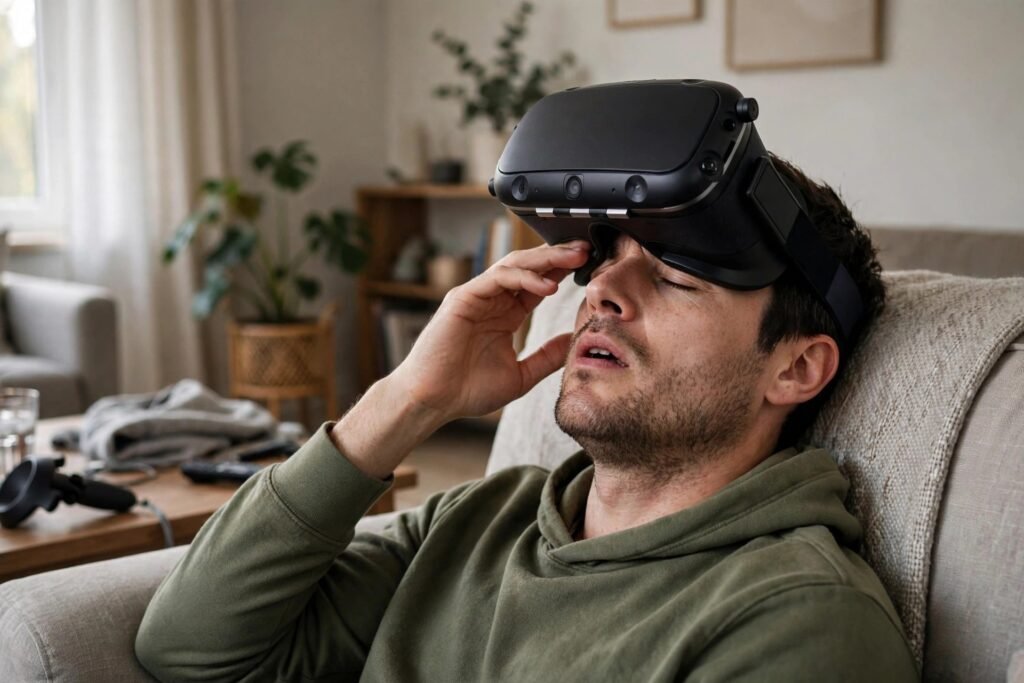
Ten minutes into the VR game, your stomach turns. The world spins when you stop moving, cold sweat starts, and you rip off the headset feeling worse than after a bad boat ride. VR motion sickness — technically “cybersickness” — affects a huge share of users, from mild queasiness to session-ending nausea. It has driven headsets into closets and convinced people VR “isn’t for them.” But cybersickness is largely manageable: it has known causes, proven countermeasures, and most people can substantially reduce it. Here’s the complete guide.
Why VR Makes You Sick: The Sensory Conflict
Motion sickness — in cars, boats, or VR — comes from sensory conflict: your eyes report motion that your vestibular system (the inner-ear balance organs) does not confirm, or vice versa. Your brain interprets this mismatch evolutionarily as possible poisoning (toxins disrupt neural signaling, causing sensory mismatch) and triggers nausea to expel the hypothetical toxin. It is a false alarm, but a deeply wired one.
VR creates uniquely potent conflict: visually, you are soaring, driving, or falling; vestibularly, you are sitting still in your living room. The wider the gap between visual and physical motion, the worse the sickness. Contributing factors: latency (delay between head movement and display update — even 20ms of lag worsens conflict); low framerate (judder amplifies the mismatch — 90fps+ is the comfort threshold for most); artificial locomotion (joystick walking while physically stationary is the worst offender — your eyes scream “moving” while your body says “sitting”); narrow field of view mismatches; and flicker or poor calibration (wrong IPD — interpupillary distance — setting strains the visual system).
Immediate Countermeasures: What to Do Right Now
Stop at the first warning sign
Nausea escalates — pushing through mild queasiness reliably converts it into full sickness that can linger for hours. The moment you feel off, stop. This is not weakness; it is how adaptation works (see below). Sessions that end slightly uncomfortable train tolerance; sessions that end in misery train aversion.
Control your breathing
Slow, diaphragmatic breathing measurably reduces motion sickness symptoms — it is one of the few interventions with solid experimental support. Breathe slowly through the nose, exhale fully. This is the same calming physiology behind natural stress-reduction techniques — the vestibular and stress systems are deeply interconnected.
Fix your settings first
Before anything else: set your IPD correctly (use the headset’s measurement — wrong IPD is a top comfort killer); enable comfort options (snap turning instead of smooth turning, vignetting/teleport movement, FOV restrictors during motion — these exist precisely for this); lock framerate at the headset’s native refresh (dropped frames are nausea fuel); and reduce visual intensity (start with stationary experiences, not roller coasters).
Physical anchors
A fan blowing on your face provides a constant physical reference that reduces conflict (and cools the sweat response); ginger (capsules or chews — modest evidence, no downside); staying hydrated; and avoiding VR on an empty or very full stomach, when tired, or after alcohol — all states that lower your sickness threshold.
The Adaptation Protocol: Building Your VR Legs
The most important fact about cybersickness: most people adapt. The vestibular system learns — with graduated exposure, the brain recalibrates its expectations and the conflict diminishes. Studies and community experience converge on a protocol:
Week 1–2: Stationary and cockpit experiences
Start with games where your virtual body is stationary or seated: Beat Saber (you stand still; the world comes to you), job simulators, puzzle games, cockpit games (driving/flight sims where the virtual cockpit provides a stable visual reference — paradoxically easier than walking games). Keep sessions to 10–15 minutes, stopping at the first discomfort.
Week 3–4: Teleport and vignetted movement
Introduce artificial movement with maximum comfort settings: teleport locomotion (no visual motion at all — just blinking between positions), snap turning, strong vignetting during movement. Extend sessions gradually as comfort allows.
Week 5+: Smooth locomotion
Try smooth joystick movement in short bursts, with vignetting enabled. Many users find their tolerance expanding rapidly at this stage — the brain has learned the new rules. Some never fully adapt to the most intense artificial locomotion, and that is fine — teleport and cockpit games are a complete VR diet on their own.
The key principles: graduated exposure (never jump difficulty levels), consistent short sessions (daily 15 minutes beats weekly marathons for adaptation), and always stop at discomfort (adaptation requires the brain to process the experience as safe — misery teaches avoidance). Most users report dramatic improvement within 2–4 weeks of this protocol.
Hardware and Setup Factors
Not all sickness is software — hardware matters: headset fit (a loose headset shifts during movement, creating visual-vestibular micro-conflicts — tighten properly); lens clarity (smudged lenses force visual strain that compounds discomfort — clean before every session); play space (room-scale experiences where you physically walk produce less sickness than seated joystick games, because visual and vestibular inputs agree — if you have the space, use it); and display quality (higher refresh rates and lower persistence displays reduce sickness measurably — this is one domain where hardware specs directly affect comfort).
Also mind the non-VR contributors: dehydration, fatigue, and screen-related eye strain all lower your threshold. If you are prone to afternoon headaches from screen time, address those basics first — VR amplifies every underlying vulnerability.
When to Accept Limits
A minority of users remain significantly sensitive despite protocol adherence — often those with high baseline motion sickness (car/boat/sea) or vestibular conditions. This is not failure; sensory systems vary genuinely. The good news: VR’s best experiences increasingly accommodate this — the medium is maturing toward comfort-first design, with teleport, cockpit, and stationary experiences representing some of its finest games, not consolation prizes. And seated, high-comfort VR (flight sims, creative tools, social spaces, Beat Saber) remains fully available. Play to your system’s strengths rather than fighting its limits.
The Bottom Line
VR motion sickness comes from visual-vestibular sensory conflict, worsened by latency, low framerates, and artificial locomotion. Counter it with: correct IPD and comfort settings, short sessions stopping at first discomfort, breathing control, physical anchors like a fan, and a graduated 4–6 week adaptation protocol from stationary to smooth locomotion. Most people adapt substantially. For the minority who don’t, comfort-first VR offers a complete experience without the nausea. The headset doesn’t have to stay in the closet.
What the Research Says About Adaptation
VR adaptation is a real, studied phenomenon. Repeated short exposures produce measurable reductions in simulator sickness for most people within one to two weeks — the vestibular system learns the new normal, much as sailors get their sea legs. Studies on ginger as an anti-nausea aid show modest but real effects, making it a reasonable supplement to behavioral strategies rather than a cure. Controlled breathing and keeping the body cool also show benefits in the literature. What does not work is white-knuckling through severe nausea; that tends to sensitize rather than desensitize, creating negative associations that make the next session worse. Road to VR covers comfort research and headset ergonomics in depth, and PC Gamer’s VR coverage tracks which new releases are comfort-friendly. Respect the process, and most stomachs come around.
Frequently Asked Questions
Why do I get motion sick in VR but not in real life?
VR creates visual-vestibular conflict: your eyes see motion your inner ear doesn’t feel. Real life rarely produces this mismatch at VR’s intensity. It’s a false poisoning alarm from deeply wired evolutionary circuitry.
Can you build tolerance to VR motion sickness?
Yes — most people adapt significantly within 2-4 weeks of graduated exposure: start with stationary experiences, keep sessions short, always stop at discomfort, and progress slowly to artificial locomotion.
What VR settings reduce motion sickness?
Correct IPD, native refresh rate locked, teleport instead of smooth locomotion, snap turning, vignetting during movement, and starting with cockpit or stationary games. Settings are the highest-leverage intervention.
Does ginger help with VR sickness?
Modest evidence, no downside — worth trying alongside the proven measures (settings, graduated exposure, stopping early). A fan on your face and controlled breathing have better support.
Are some people just unable to do VR?
A minority remain sensitive despite best practices, usually those with high baseline motion sickness. Comfort-first VR (stationary, cockpit, teleport games) still offers a complete experience for them.