
How Much Storage Do You Really Need on a New Smartphone?
Phone makers love upselling you from 128GB to 256GB to 512GB, each jump costing $100 or more. But how much storage do you really need on a new smartphone? For most people, the answer is less than the salesperson suggests — and there’s a 30-second check that tells you exactly what you need.
I’ve watched friends pay an extra $200 for storage they’ve never touched three years later. Here’s how to size it right the first time.
The short answer: 128GB is enough for light users who stream everything and use cloud photos. 256GB is the sweet spot for most people. 512GB+ is for heavy video shooters, mobile gamers, and anyone who keeps everything offline. Check your current phone’s actual usage before deciding.
Check Your Current Usage Before You Buy
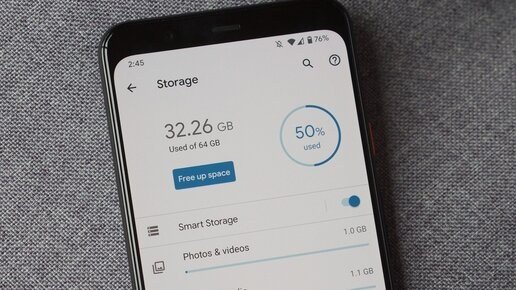
This is the step that makes the decision easy. On iPhone: Settings > General > iPhone Storage shows exactly how much you’re using and what’s eating it. On Android: Settings > Storage. If your current 128GB phone has 40GB free after two years, you don’t need 256GB — you need 128GB again.
Pay attention to the breakdown, not just the total. Photos and videos are usually the biggest chunk, followed by apps and their cached data (streaming apps are sneaky — downloaded Netflix shows and Spotify playlists add up). Messages with years of photos and videos can quietly eat 10–20GB. Knowing your actual pattern beats guessing every time.
Who Needs What: 128GB vs 256GB vs 512GB
128GB works if you stream music and video instead of downloading, use iCloud or Google Photos for your camera roll, and don’t install dozens of huge games. It’s genuinely fine for a lot of people — and it’s the cheapest option, often $100 less than the next tier. The risk: 4K video fills storage shockingly fast (about 400MB per minute), so one vacation of heavy filming can hurt.
256GB is where I’d put most buyers in 2026. It comfortably holds a big photo library, offline playlists and shows for flights, and a healthy app collection, with headroom to spare. The $100 premium over 128GB is reasonable insurance against three years of accumulating stuff. 512GB and 1TB are for specific needs: shooting lots of 4K video, carrying a massive offline media library, or keeping a phone for 4–5 years without ever thinking about storage.
- 128GB: light users, streamers, cloud photo backup — cheapest option
- 256GB: the sweet spot for most people in 2026
- 512GB: heavy 4K video shooters, big offline libraries, 4–5 year keepers
- 1TB: professionals shooting high-end video regularly — overkill for most
Ways to Need Less Storage Than You Think
Cloud photo backup is the biggest lever. With iCloud Photos or Google Photos set to back up originals, you can enable ‘optimize storage’ and keep only thumbnails on the phone — this alone can free 50–100GB for photo-heavy users. It costs $0.99–$2.99/month for most people, far less than a storage upgrade.
Other trims: stream instead of downloading (Spotify, Netflix, podcasts), offload unused apps (iPhone does this automatically, keeping your data), and clear out old message attachments yearly. If your phone storage says full when you barely have any apps, cached data and old downloads are usually the culprits — a cleanup can buy you another year on your current phone.
The Resale Angle Nobody Mentions
Here’s a practical consideration: higher storage holds resale value better. A 256GB iPhone typically resells for $50–$80 more than the 128GB version, so part of that $100 upgrade comes back to you. It also sells faster — used buyers filter by storage, and 128GB models sit longer.
That said, don’t buy storage as an investment; buy what you’ll use. The resale bump is a nice bonus, not a reason to jump to 512GB you’ll never fill. Match the tier to your actual usage from step one, lean one tier up if you’re between sizes or keep phones for 4+ years, and put the savings toward a case and AppleCare instead.
How Much Storage Do I Really Need on a New Smartphone? Future-Proofing Your Choice
Think about how long you’ll keep the phone, because storage needs grow. App sizes inflate yearly, photo and video resolutions climb, and offline downloads accumulate. A good rule: take your current usage, add 50% for three years of growth, and round up to the next tier. If you use 90GB today on a two-year-old phone, 128GB will feel tight by year three — 256GB is the comfortable pick.
Also consider the hidden storage tax of software updates: major iOS and Android updates need 5–10GB of free space to install, and phones with nearly-full storage famously fail updates. Keeping 15–20% free isn’t just nice — it’s functional. If you’re the type who never deletes anything, that alone justifies sizing up one tier beyond what today’s usage suggests.
Also factor in how you actually use the phone: mobile gamers should add 64–128GB to whatever tier the usage check suggests, because modern games run 5–20GB each and you can’t cloud-stream them all. Photographers who shoot ProRAW or ProRes need to think in multiples — a minute of ProRes 4K is about 6GB. And if you hand the phone down to a kid later, extra storage extends its second life enormously. Buy for the heaviest user the phone will ever serve, including future ones. When torn between two tiers, choose the larger — storage regret only flows one direction, and nobody has ever complained about having too much space.
Related reading: why your phone storage says full with barely any apps · how to back up your entire phone before getting a new one
The Bottom Line
Check your current phone’s storage breakdown first — it tells you exactly what you need. 128GB suits light cloud-first users, 256GB is the sweet spot for most people, and 512GB+ is for heavy video and offline libraries. Cloud photo backup can shrink your needs dramatically, and higher tiers do resell better as a bonus.
Sources: Apple iPhone support pages · Google Android help center







1 thought on “How Much Storage Do You Really Need on a New Smartphone?”