
Best Password Managers for Families in 2026 (Compared Honestly)
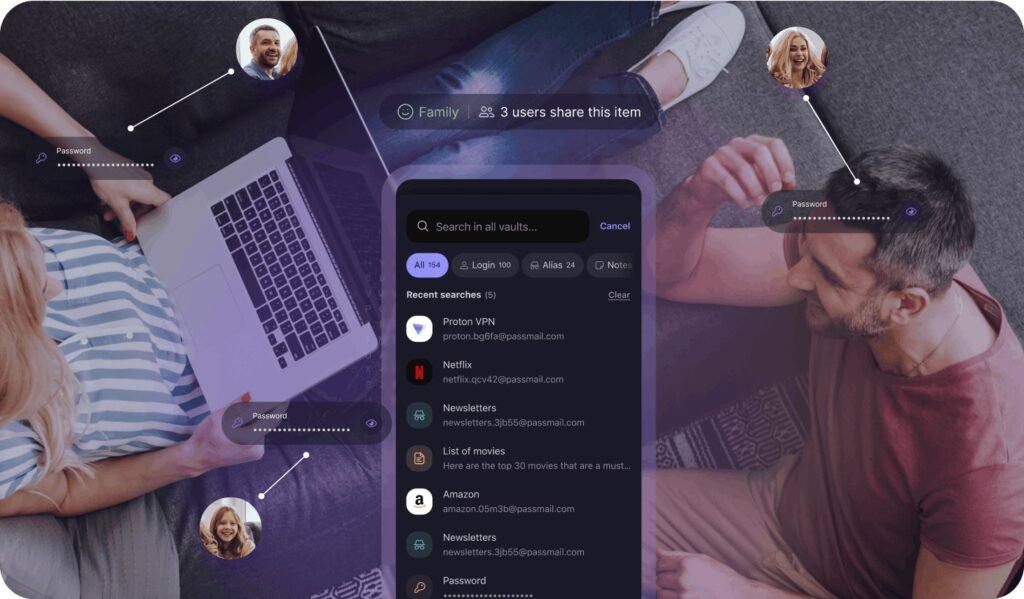
Your family shares Netflix, the Wi-Fi password, the kids’ school portals, and about forty other logins — most of them scribbled on sticky notes or reused everywhere. A family password manager fixes all of that for a few dollars a month, and it’s one of the highest-value subscriptions a household can have.
But which one? The best password manager for families isn’t necessarily the best for individuals. Here’s how the top options compare on the things families actually care about: price per person, sharing, and ease of use for non-technical family members.
The short answer: 1Password Families ($4.99/month for 5 people) is the best overall — polished apps, great sharing, and guest accounts. Bitwarden Families ($40/year for 6 people) is the best budget pick and open-source. Dashlane is a solid premium alternative with a built-in VPN.
What Is the Best Password Manager for Families? The Top Picks
1Password Families is my top recommendation for most households. At $4.99/month for up to 5 people, everyone gets their own private vault plus shared vaults for things like streaming logins, the Wi-Fi password, and kids’ school accounts. The apps are the most polished in the business — genuinely pleasant on iPhone, Android, and desktop — which matters because a password manager only works if your family actually uses it. You also get 1GB of document storage per person and the excellent Watchtower feature that warns you about breached or reused passwords.
Bitwarden is the value champion: $40/year covers 6 people, and it’s open-source, which security folks love because the code is publicly audited. The apps aren’t as pretty as 1Password’s, but they’re fully functional and the family organization features (collections for sharing) work well. If anyone in your house is technical, they’ll probably prefer Bitwarden on principle. Dashlane ($4.99/month for up to 10 people on some plans) rounds out the top three with a built-in VPN and a slick interface, though its family sharing isn’t quite as refined.
What Families Should Look For
Shared vaults are the killer feature — that’s how the Netflix password stops living in a group chat. Look for unlimited shared items and the ability to set permissions (kids can use the streaming logins without seeing the banking vault). Individual private vaults matter too; teenagers don’t want parents browsing their accounts any more than parents want kids in theirs.
Ease of onboarding is underrated. The best family password manager is the one your least technical family member will actually use, so prioritize good autofill, Face ID/fingerprint sign-in, and simple sharing. Emergency access — letting a trusted person into your vault if something happens to you — is a feature worth having and easy to overlook until you need it.
- Shared vaults with per-person permissions
- Private vaults for each family member
- Biometric sign-in (Face ID/fingerprint) on all devices
- Emergency access for a trusted contact
- Breach monitoring that alerts you to compromised passwords
How to Get the Whole Family On Board
Rollout strategy matters more than the app choice. Start with yourself — get comfortable for a week — then add your partner and migrate the shared accounts together (streaming, utilities, Amazon). Make it a 20-minute session, not a lecture. For kids, frame it as their own private vault for school and gaming logins; teenagers adopt fast once they see it’s easier than resetting passwords constantly.
Don’t try to migrate all 200 saved logins in one sitting. Import from your browser first (all three managers offer one-click browser import), then update passwords gradually as you log into sites. Enable two-factor authentication on the password manager account itself — it’s the keys to the kingdom, so protect it accordingly. And print the emergency recovery kit and store it somewhere safe, like a fireproof document bag.
Free Options: Are They Enough for Families?
Bitwarden’s free tier is genuinely excellent for individuals — unlimited passwords, all devices — but family sharing needs the paid Families plan. Apple’s iCloud Keychain and Google Password Manager are free and built in, and they’re fine for a single person’s basics, but their sharing features are limited and they lock you into one ecosystem.
My take: $40–$60/year for a proper family plan is trivial compared to the cost of one compromised account. A single hacked email can cascade into banking, shopping, and social accounts — which is exactly how you end up wondering how to tell if your phone has been hacked when the real problem was a reused password. Pay for the family plan; it’s the cheapest security upgrade you can buy.
What Is the Best Password Manager for Families With Teenagers?
Teenagers change the requirements: you need sharing that respects their privacy while keeping them safe. The setup that works: each teen gets their own private vault (their business), plus shared family vaults for streaming, Wi-Fi, and school portals. Make the boundary explicit — ‘we don’t look in your vault; you don’t share passwords outside it’ — and teens actually adopt the tool instead of routing around it.
Use this as the moment to kill password reuse, which is rampant among teens (one gaming-forum breach shouldn’t compromise their email). The password manager’s breach-monitoring feature does the lecturing for you — ‘have I been pwned’ alerts are more persuasive than parental nagging. And set up emergency access both ways: you into theirs for genuine emergencies (with a clear policy on when you’d use it), discussed openly rather than sprung later.
One more practical tip: put the family’s most important shared logins (banking, insurance, medical portals) in a vault the teens can’t see. Privacy goes both directions, and modeling it teaches more than any lecture about digital boundaries.
Related reading: how to set up two-factor authentication on your accounts · how to tell if your phone has been hacked
The Bottom Line
1Password Families ($4.99/month, 5 people) is the best all-around pick; Bitwarden Families ($40/year, 6 people) is the best value. Prioritize shared vaults, biometric sign-in, and an app your least technical family member will use. Migrate gradually, protect the master account with two-factor authentication, and store the recovery kit somewhere safe.
Sources: 1Password Families plans · Bitwarden families pricing






3 thoughts on “Best Password Managers for Families in 2026 (Compared Honestly)”